
Add a Admin To Facebook Page: 5 Easy Steps to Follow

- key takeaways
- Your Growth is One Click Away!
- Need for Having Several Facebook Pages Admins: How to Invite Another Admin?
- Step 1: Go to Your Facebook Page
- Step 2: Choose Add New Access
- expert tip
- Daniel Carter
- Step 3: Choose the Proper Permission Level
- Step 4: Send the Invitation
- Step 5: Confirm the New Admin
- The art of adding the correct people to make things successful!
- Conclusion
- faq
Handling the Facebook Page all by yourself requires effort and concentration. Business people require assistance in responding to customers, content planning and managing campaigns. This is the reason why brands add a admin to Facebook page rather than do everything on their own.
key takeaways
- Adding an admin to your Facebook Page will take just a couple of minutes.
- Meta Business Suite gives you more control over team access.
- Full Control provides full management permission.
- Task Access allows you to limit actions for increased security.
- Once a team member leaves your organization, remove their access.
- Periodically review your permissions for the protection of your organization.
Facebook has made some updates in its Page Management system recently. The old Page Roles are now listed under Page Access in some accounts. This new system gives you better control over permissions and security. Knowing how to add a admin to Facebook page prevents possible errors.
Most entrepreneurs fear granting too much power. This is understandable because the admin has various options, such as changing the settings, running campaigns, sending out messages, and deleting users. The great thing about Facebook is that there are several access levels depending on the needs of the business.
Your Growth is One Click Away!
Page management on Facebook becomes an easy task with a proper strategy and proper people. Buzzion helps brands to create more efficient social media systems that will give you more time and money.
Need for Having Several Facebook Pages Admins: How to Invite Another Admin?
Facebook Page is normally the center of all customer interaction. Customers ask questions, give feedback and interact using the message system throughout the day. One individual can’t do everything, hence misses certain opportunities.
There are various reasons why businesses choose to give administrator privileges on their Facebook pages.
Business Need | Benefit |
Customer support | Faster replies to messages |
Content publishing | Consistent posting schedule |
Advertising | Better campaign management |
Team management | Shared responsibility |
Emergency backup | Someone always has access |
Several administrators also reduce the risk factor in the business. What would happen if you found yourself locked out because one of your employees left your company? Another administrator would be able to get you back into your page without disrupting business.
Step 1: Go to Your Facebook Page
Log in to your Facebook account that owns the Facebook Page. From the menu in your profile, go to your Facebook Page. From there, click Settings and then Page Access. All the people with access privileges will show up.
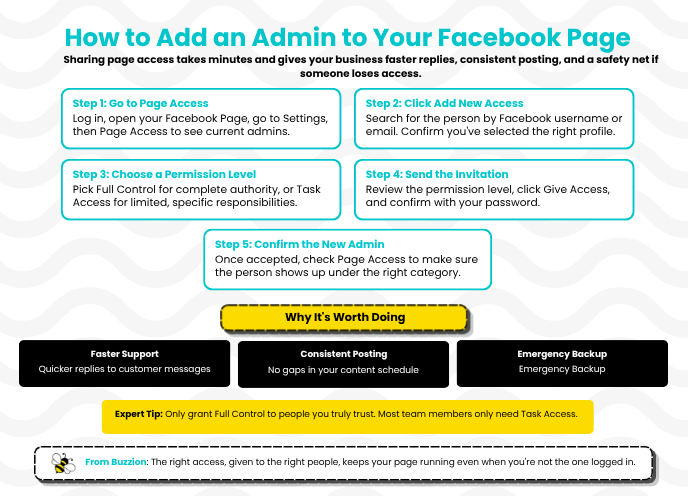
If you use Meta Business Suite, then open the dashboard first. The access controls will still be easy to find under the user management feature. It is much easier to add a admin to Facebook page.
Step 2: Choose Add New Access
Click on Add New from the Page Access panel.
You will need to search for the individual by entering his/her Facebook username or email. Make sure that you select the correct profile since access permission will become effective after the approval.
expert tip
“Always grant Full Control to people you can trust with your entire business page. Not all designers, writers, and marketers require all the permissions. Proper management ensures that there will be no unintended changes to your Page.”

Daniel Carter
SEO Strategy Specialist
Step 3: Choose the Proper Permission Level
Instead of traditional Page Roles, Facebook offers more flexible access management. Select Full Control if the person requires full authority to manage the page. Select Task Access if the person only manages some specific tasks on the Page. It all depends on daily responsibilities, not the position.
Step 4: Send the Invitation
It is important to review the permission level one more time before sending the invitation. Click on Give Access to send the invitation. As the last safety measure, Facebook will ask for the password of your account. This is how Facebook protects the page from any changes.
The invited person gets an invitation. To make the permission valid, he or she needs to accept it. Nothing will change in the Page until the person accepts the invitation.
Step 5: Confirm the New Admin
Go back to the Page Access area once the request is approved. See if the new name pops up under the right permission category. If you find the wrong access category, then you can change or delete it anytime.
Review your list of admins regularly. Delete former workers from your admin list. Being able to make someone an admin on a Facebook page also entails deleting one.
Join us here for further information on Facebook and other social media platforms!
The art of adding the correct people to make things successful!
Buzzion can help your company create an excellent Facebook strategy that engages your customers and drives traffic. Let us do the work for you.
Conclusion
Knowing how to add a admin to Facebook page is essential for all businesses. It saves time and effort. It is easy to do but ensures better cooperation, increased security, and improved management processes. Assign proper permissions to every person and check access from time to time. Buzzion offers its services to help businesses succeed in social media.
faq
why should I add a admin to facebook page?
The addition of one more admin would enhance cooperation. This would allow managing the Page even in case the owner cannot do it.
how to make someone an admin on a facebook page?
Open Page Access in the settings of your Page. Click on Add New. Select the person. Give Full Control access. Confirm with your password. The person becomes an admin by accepting the invitation.
how to add an admin using meta business suite
Open Meta Business Suite. Go to Settings and then Page Access. Invite the user and give the necessary permission. Send an invitation.
explain facebook page access vs page roles.
Page Access is a new permission system on Facebook. It replaced the previous Page Roles in many accounts. It helps owners to manage user permissions.
explain full control vs task access on facebook pages.
Full Control access implies managing the whole page. Task Access allows doing only selected tasks such as posting messages or advertising.